
Step 2 is to put every post on your website first. When you finish, the Website entry of your brand profile has no empty line.
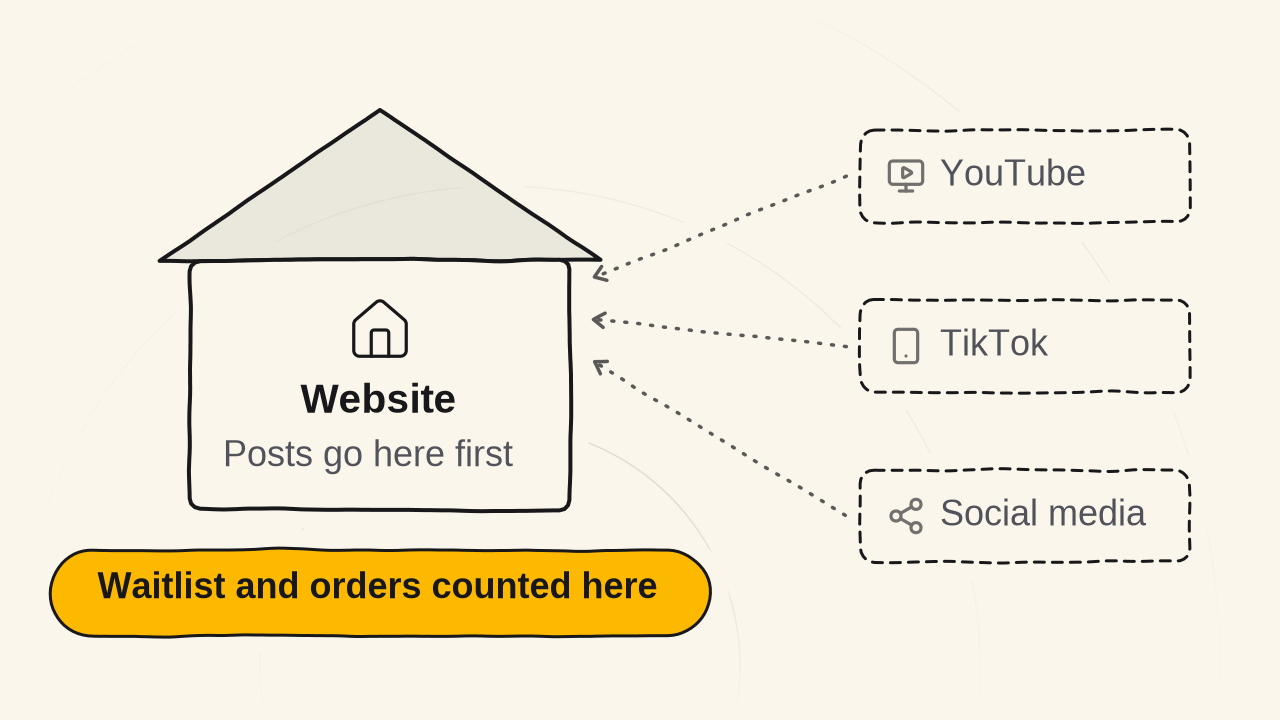
The website comes right after the product because the posts on it are what the process makes, and it is where the waitlist and the orders are counted.
What to prepare
- The Product entry filled in at step 1, with the status on sale or taking a waitlist. That status decides whether you need a sales page or a waitlist page.
- A website with a page builder. Every website has a page builder, so a sales page or a waitlist page is just a new page on it.
Where three parts meet
The three parts of the system meet in the post on the website:
- The funnel picks the post.
- The process makes it.
- The Truth vault keeps what the brand really did through it.
The three steps below fill in the Website entry and set the habit of posting.
Write the website address in the profile
Writers and AI agents need to know where a post will go before they write it. Open the Website entry of the brand profile and write the domain. If the website has several languages, write the path of each one. The cuongthach.com profile has English at
/and Vietnamese at/vi/. You will have the Address line.Make the page the Love post leads to
The system is measured by people on the waitlist and by orders, counted on the sales page and the waitlist page. Make a new page with your website’s page builder.
The page only needs to show readers quickly what the product includes, how they get it, and a button to pay or sign up. Write down the page’s path and where it is counted. The cuongthach.com profile has:
- The product page
/vi/viet-de-ban/. - The waitlist page
/vi/viet-de-ban/#giu-cho. - The waitlist counted in FunnelKit Automations.
You will have the Sales page line and the Waitlist page line.
- The product page
Post every piece on the website first
Website first, other channels after, because YouTube, TikTok and social media are copies that send viewers back to the website. When a post is through the Edit step:
- Copy it and paste it into your website platform.
- Add the cover and the pictures you have.
- Check the SEO title and description.
- Publish.
Only after that, make versions for other channels, each with a link back to the post. You will see that every post has an address on the website before it has a copy anywhere else.
Three signs it is done
This step is done when all three signs below are true:
- The Website entry of the profile has the address and the page the Love post leads to, with no empty line.
- Every post is on the website first, and its copies on other channels lead back to it.
- You know where people on the waitlist and orders are counted.
Without the Website entry, do not run the system, because with no website, posts have nowhere to go. If you do not know where things are counted, the system runs but you cannot see whether it leads to the product.
Post not on the website yet
Readers only reach the waitlist or the sales page once they are on the website, and the profile must state the real status of the product.
Posted on social media only
If a post is only on social media, put it on the website like every other post, then change the social media copy to lead back to the website. Readers only reach the waitlist or the sales page once they are on the website.
Product already on sale
Write Not yet on the Waitlist page line, and do not delete the line. The Love post leads to the sales page.
When the product is taking a waitlist, it is the other way around. The waitlist page is where the Love post leads, and there may be no orders to count yet. The cuongthach.com profile says the orders are counted by hand, because sales are not open yet.
Related pages
- It does not show how to fill in the brand profile: see Brand profile.
- It does not show how to build a sales page: see Build a sales page.
- It does not explain the Love post that leads readers to that page: see Love post.
- It does not cover the tools that help run the website: see Secure Custom Fields, Create llms.txt for WordPress and Report bugs with Google Vids.