
The Edit step is the last step of Idea - Write - Edit. You play the editor: tighten the opening, cut the rough draft, put it in your customer’s words.
What this step makes is a finished post, ready to publish. The stopping point is when you and your customer both understand it, and the post is tight and goes straight to the point. The Edit step starts only once you hold the rough draft from the Write step.
This page covers what the Edit step makes and why it only cuts. To do it move by move, read Edit a draft into a post and tighten the opening. If you are stuck at this step, read Stuck at the Edit step.
The Edit step makes the finished post
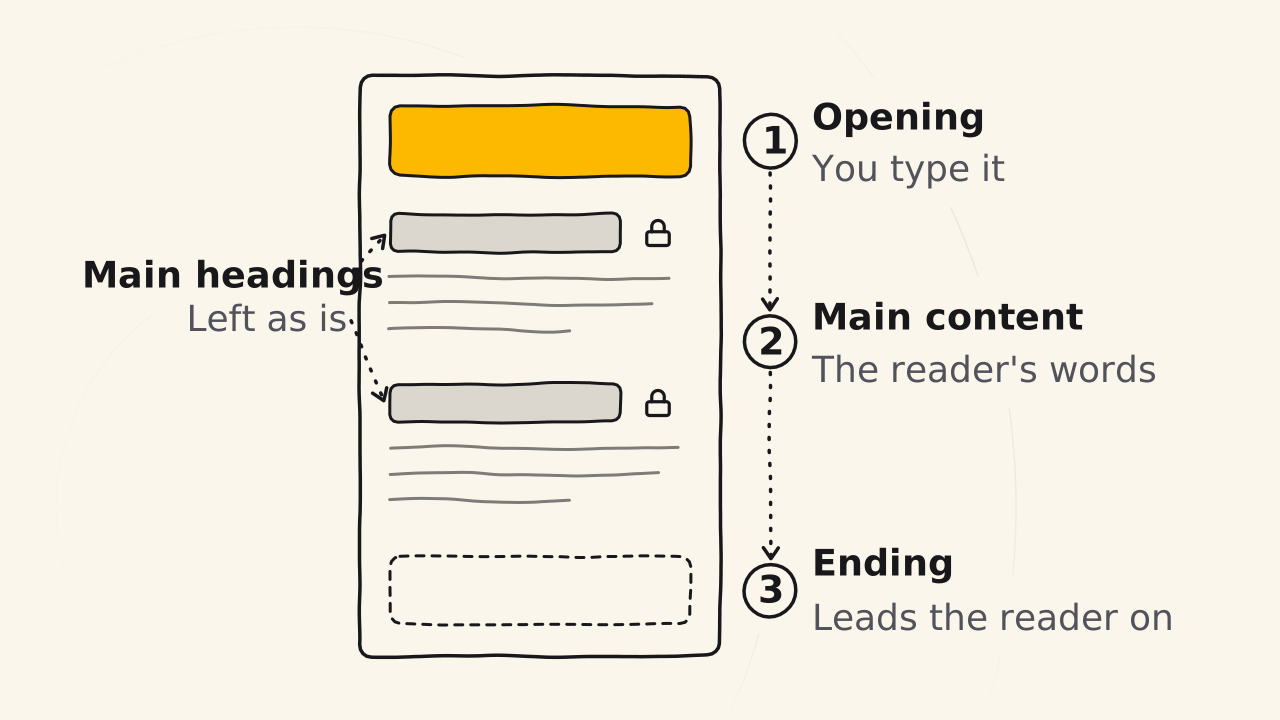
The Edit step is when you cut. You edit the content you wrote, not the locked outline, and work in this order:
- The opening first.
- The main content.
- The ending that leads readers on.
This is the step that makes customers like the post: it gets shorter, tighter, just enough and straight to the point, without drifting from the message.
The opening comes first
The opening and the ending are not in the outline. Once you have answered every idea, the opening shows up on its own, and you type it, together with the ending, in this step. This is the place to type yourself, because the opening takes empathy for the reader, and only people can feel for each other.
The opening also changes with the type of post, because the readers of each type want something different. Know, Trust and Love posts go through the same Edit step, but each type opens in its own way.
Cut, and put it in your customer’s words
An editor cuts what the director wants, not what the editor wants. You put expert words into your customer’s words and cut repeats, extras and parts only you understand.
Why does the Edit step only cut?
The Edit step only edits what you have written. To change the ideas of a post, go back to the Idea step instead of writing more in this step.
A post is long by ideas, not by words
To make a post longer, add ideas in the Idea step, not words in the Edit step. A post with ten ideas is long on its own, while a post with three ideas stretched to a word count reads thin. A post that is too short is missing ideas, not words.
Cuong’s example: a recording of 10,000 words usually comes down to 4,000 to 5,000 words after editing, and you can keep up to 7,000 when you talk close to the post. The thicker the draft, the more solid the post you squeeze out of it. Squeeze a draft that is too thin and the post ends up paper thin.
A recording always has extra, so cut without mercy
A recording always has extra: Cuong records about 10,000 words, the post ends up at about 3,500, so you cut without mercy. When you write, it always feels like too little, and every cut makes you afraid the post will get shorter.
The snag is word hoarding: you hate to see yourself throw away 60 or 70% of what you said, so you stuff it back into the post, and your customers get distracted. An idea cut from this post is not lost: save it for another post.
What does a fully edited post look like?
A post is fully edited when:
- You understand it.
- Your customer understands it.
- You like it.
It is tight, goes straight to the point, and the titles of the big ideas are still exactly as in the locked outline. The goal of a post is for customers to understand it, not for them to praise the writing, so the Edit step does not ask for fine prose: fancy words, figures of speech and slang make a post harder for readers, AI and Google to understand.
AI finds repeats and does a rough squeeze very fast, so it helps you a lot in this step. Its job is to sort, split and clarify your ideas, not to change your voice unless you ask it to.
You are the final reviewer: a mistake you leave in is your fault, not the tool’s. What AI does in each step is in What AI does in each Idea - Write - Edit step.
Read next
Outline from one line
Turn a one-line topic into a locked outline with three starter questions, pouring out every idea, then filtering it by the core message.
Record and check the transcript
Record on your phone with the internet off, let the app turn your voice into text, then check the names before you filter ideas or edit.
Write a first draft in one go
Fill your outline's blind spots, then go offline and pour out what you understand of each idea, by keyboard, voice or pen, into a first draft.