
The Edit step turns a rough draft into a finished post by cutting, not adding. You edit the content you wrote, keep the locked outline as it is, and work in this order:
- The opening first.
- The main content.
- The ending.
This is the step that makes customers like the post: it gets shorter, tighter, just enough and straight to the point, without drifting from the message.
This page is for you when you have a rough draft written from an outline. If you do not have a draft yet, read Write a first draft in one go from the outline first.
What do you need to edit a post?
- A locked outline, made of the post title and the main idea titles. You check against it all through this step.
- A rough draft written from that outline, long and not yet edited. The thicker the draft, the more solid the post you squeeze out of it. Squeeze a draft that is too thin and the post ends up paper thin.
- 30 minutes to 1 hour for a post recorded in about 1 hour. Cuong takes about 30 minutes to edit, and with AI helping it is faster, about 15 minutes.
Edit a draft into a finished post
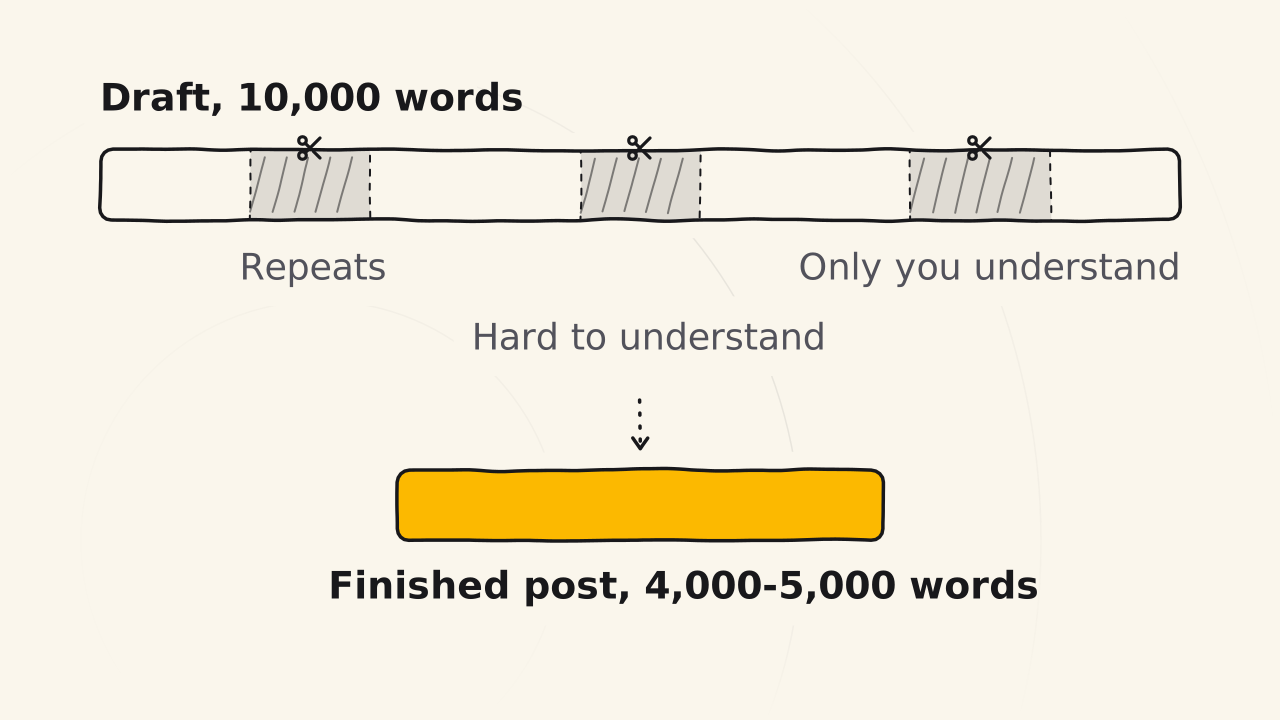
The three steps below go from a rough draft to a post ready to publish: tighten the opening, cut the main content, then write the ending and publish.
Tighten the opening first
The opening is the most important and most time-consuming part of the Edit step, so do it first. The outline has no opening.
Now that the draft is full, you can finally see what the post really says. Once you have answered all the ideas, the opening comes to your mind on its own. Type it yourself in your own words: AI struggles to write an opening that draws readers in, because it takes empathy for the reader, and only people can feel for each other.
The opening is short, just enough to lead readers into the main content. It names the exact problem readers have so they feel understood, then points straight at the solution. Make it too long and readers leave before they reach the main part. You will have a few opening lines that name the post’s problem and solution.
Cut the main content and switch to your customers' words
Read one idea at a time and mark the extra. When it feels like too much, cut it.
- Places that say one idea two or three times.
- Places that are hard to understand.
- Places only you understand.
- Places that only barely touch the idea.
AI finds repeats and does a rough squeeze very fast. Its job is to sort, split and clarify your ideas, not to change your voice unless you ask it to. You are the final reviewer: a mistake you leave in is your fault, not the tool’s.
A draft from a recording sounds like speech. Turn most of it into written style, about 70%, and keep some spoken style so it feels close: all spoken style is risky, and all written style feels distant. A personal brand keeps more spoken style, and a business keeps less.
For each expert term, ask: “would my customer say this word?” If not, swap it for the word they really use, and do not make up new words. Turn long sentences into short ones, so customers never have to stop and think.
Add lists, tables or pictures where readers need to scan. Do not add words to reach a length: a post is long because it has many ideas, not many words. You will see a 10,000 word draft usually come down to about 4,000 to 5,000 words.
Write the ending, adjust the description and publish
End with a clear next step: what to read or do after this post. The post title stays as it is, because you locked it in the Idea step. Only make the description clearer and adjust the SEO title: the SEO title has a length limit, so if the post title runs a word or two over, this is where you trim it.
Copying the post and pasting it into your website platform is the fastest way to publish. Add the cover image and the pictures you have, check the SEO title and description, then publish. You will have a post live on your website.
What do readers scan before they read a post?
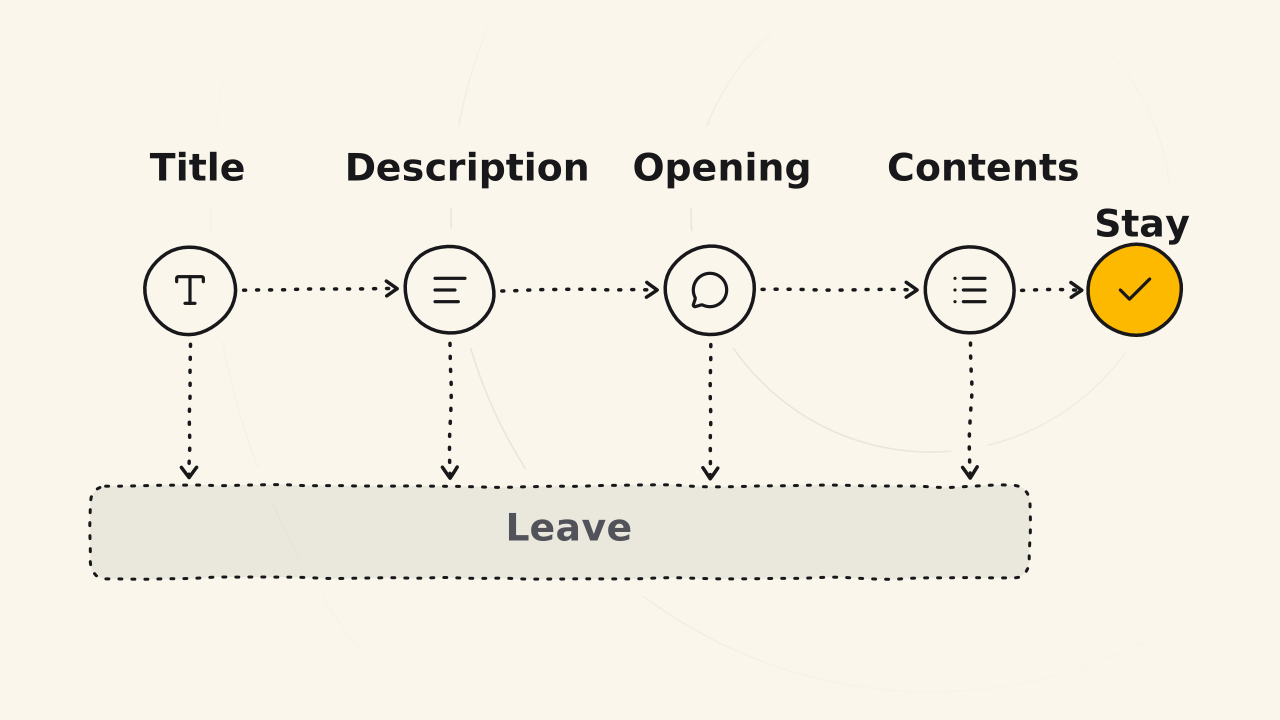
Readers decide whether to stay or leave after scanning just four things. Those four things must match and say the same thing.
| Part | Its job |
|---|---|
| Title | A promise |
| Description | A quick summary, usually the core message |
| Opening | Names the problem so readers feel understood, then points straight at the solution |
| Main content | The big ideas, which readers see at a glance in the table of contents: they flow, have their own character, and are not like other posts |
Many people read only as far as the table of contents and stop. If the opening is good but the table of contents is choppy, bland or like other posts, they still leave. Each post type has a different opening, because readers want something different from a Know post, a Trust post and a Love post.
How do you know the post is fully edited?
- Are the main idea titles exactly as in the outline? If you changed them, change them back. The content below was written for the old titles.
- Is the post much shorter than the draft? If it barely got shorter, read each idea again and cut the repeats.
- Is there a term customers have to read twice to understand? If so, switch it to their words.
- Reading the four things in the table above, do you want to keep reading? If not, rewrite the opening.
- Do you understand it, do customers understand it, and do you like it? If yes, the post is ready to publish. This is where the Edit step stops.
If the edited post does not come out as expected
The edited post is too short and missing ideas
The Edit step only cuts, so a post that is too short is missing ideas, not words. Do not add words to reach a length. Go back to the Idea step to add ideas, because a post with ten ideas is naturally longer than a post with three.
The titles and the content no longer match
You changed a title while editing, so the title changed meaning while the part below kept the old one. Change the title back to the one in the locked outline.
You are afraid to cut because you hate losing words
A draft from a recording is always more than you need: for example, 10,000 recorded words come down to 3,500 when published. That extra is there so you can cut without holding back.
Cuong calls this word hoarding: you hate to see yourself throw away 60 or 70% of what you said, so you stuff it back into the post, and your customers get distracted. An idea cut from this post is not lost: save it for another post.
Read next
Truth vault
This page shows what the Truth vault keeps and how facts go in and out, the docs where a brand's posts, pages and AI answers get their facts.
Build a three-post funnel
Build the smallest funnel of three linked posts, from a Know post to a Trust post, then the Love post and your sales page, to start selling now.
Publish in short free slots
Split the three Idea - Write - Edit steps across short free slots, one step per slot, so you keep posting without needing a whole free day.