
It is the fastest and easiest way in for a customer, so it is also the layer with the most Know posts.
Which posts are in the Know layer?
The Know layer holds the posts that name a problem, a pain your customer has. Readers click because the pain is theirs. They do not click because they know you yet.
Signs that a post belongs to the Know layer
A post belongs to the Know layer when it stops at explaining. What the thing is, where it comes from, and how it can change. The post has no step-by-step instructions. Instructions are the job of the Trust layer.
A Know post has a strong pull. Readers see their problem named right. They see that it has a solution. And for the first time they understand why it happens. That is when they say “wow” in their heads. What creates that moment is:
- A new angle, a new way to approach the problem.
- An easy explanation with real depth of analysis.
- Evidence, opinions, and things nobody else out there is saying.
Look at a site with many posts and you can spot a Know post by its goal: to help the reader understand the problem.
Every Know post points to your product
A Know post puts the customer at the center and points toward your product. You do not write posts that have nothing to do with your product, even when the topic is popular.
You also do not write weak posts just to fill a count. A Know post carries your own original view, drawn from the work you have really done.
How many posts does the Know layer need?
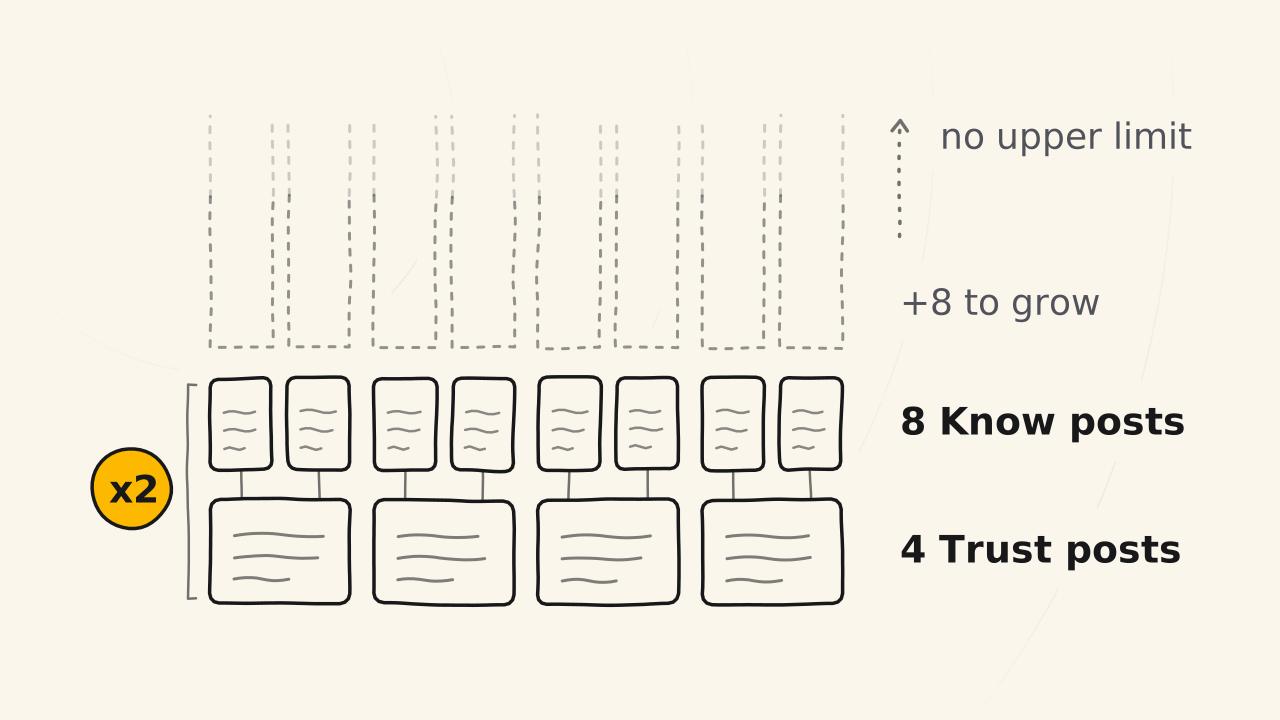
The Know layer needs many posts, and there is no upper limit. One Know post is not enough. One post for each layer is only a funnel frame.
At least twice the number of Trust posts
A funnel has one Love post and at least three or four Trust posts. Each Trust post is paired with a Know post, so the number of Know posts is at least double the number of Trust posts. With 4 Trust posts, you need 8 Know posts.
The Know layer has no limit because information keeps changing. Your product changes, the market changes, new technology arrives, and Know posts change with them. This is the layer that grows the most. Its content is hard to write, and it changes the most, so it must always stay fresh. The more touchpoints the better, because customers touch you through these very posts.
The Know layer grows in three stages
| Stage | What the Know layer does |
|---|---|
| 1. Funnel frame | One Know post, with one Trust post and one Love post. The Love post is written first |
| 2. Build in pairs | Each Trust post, which comes from the Love post, gets a paired Know post: Trust first, Know second |
| 3. Expand the Know layer | Know posts for demand the market has already proven, and for trends: Know first, Trust second |
You expand the Know layer once you have the Love post and the Trust posts as a base. Say you have 4 Trust posts and 8 Know posts. You are then ready to add 8 more Know posts, for 16 in all, to raise the number of touchpoints. If a Trust post is missing, you build it. And so on, one Know and Trust pair at a time.
Every Know post must lead to a Trust post
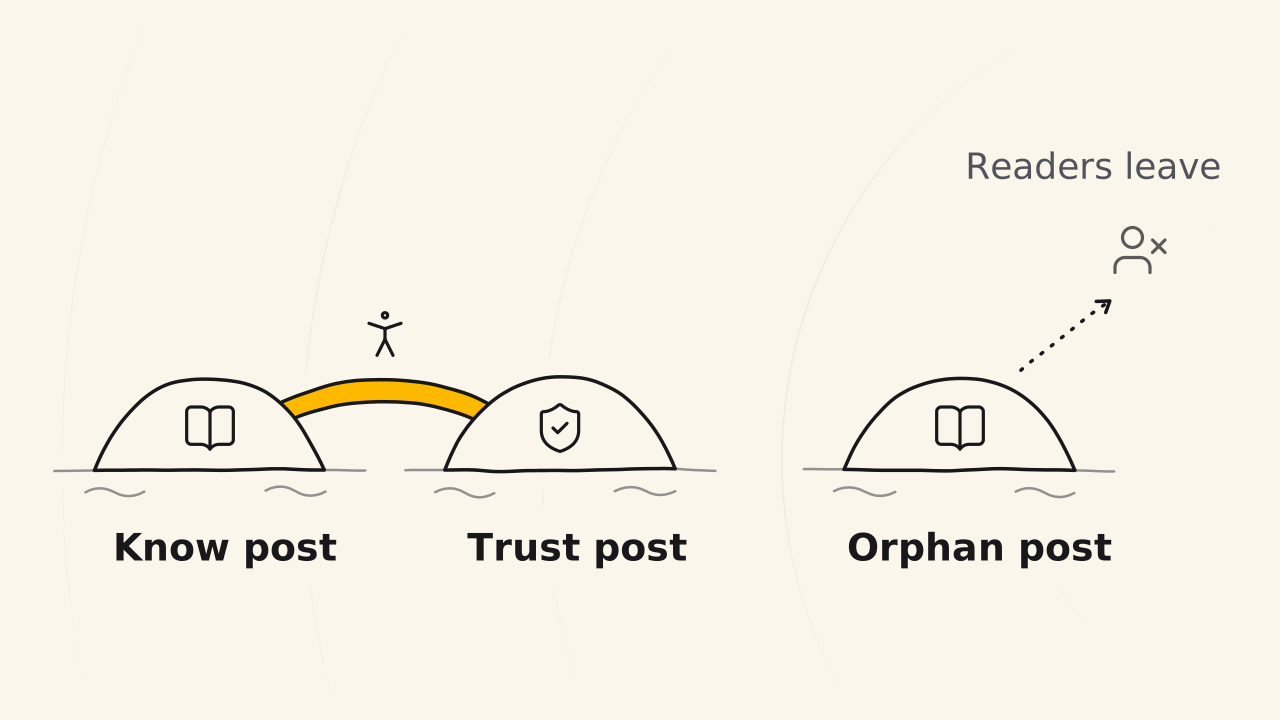
A Know post with no path to the Trust layer is an orphan post. It is weak, it is alone, and it does not lead the reader down the funnel. The reader finds it good, learns one thing, and leaves.
A path changes that. After a Know post, the reader has a guide to follow right away, and they like that more than a dead end. The invitation to the Trust post sits at the end of the post.
So when you plan to write more, say 10 Know posts that follow a trend on Facebook:
- Do the posts that already have a Trust post to lead to first.
- Leave the posts that have no Trust post yet for later. That gives you time to prepare a Trust post that flows from it, or to check whether that post is really for your customer.
Do not rush to expand the Know layer before the base of the funnel is ready.
How do you know the Know layer is touching customers?
You measure by the reader’s path, not by the views of each post.
Read the reader’s path in Google Analytics
Google Analytics (GA) shows which page a reader enters, how long they read, and where they go next. It also shows the bounce rate and the time on page.
The clearest sign of a touch is a reader who reads for a long time, reads to the end, then clicks to the Trust post at the bottom. If they do not agree with your view, they have no reason to click. When they click, it means they liked the post and agree with you.
When readers leave too fast
A high bounce rate means the post has not touched the reader. The cause is usually one of two:
- The content repeats what others say. There is nothing original in it.
- The content is original, but the opening does not pull the reader in. They read the first line and leave. The title, the description, and the cover image can be the weak spot too.
Fix it from light to heavy. First, fix the opening line, the title, and the description. If it still does not touch, rewrite it as a different post. A post that is useless and makes the site thin gets deleted.
Example of the Know layer growing with the Trust layer
This is the example Cuong uses to count posts, for a funnel that already has a Love post:
| When | Trust posts | Know posts | Next step |
|---|---|---|---|
| Funnel frame | 1 | 1 | Build more pairs, one Know and Trust pair at a time |
| Enough Trust posts as a base | 4 | 8 | Ready to expand the Know layer |
| After expanding | 4 | 16 | Build any Trust post that is missing |
The number of Know posts is always at least double the number of Trust posts, and it grows as you find new touchpoints.
What does the Know layer not do?
- It does not give step-by-step instructions. That is the job of the TRUST layer.
- It does not sell the product. A Know post leads to a Trust post. It does not lead straight to the product.
- It does not hold posts that stray from the product. A topic with many readers that does not point to your product does not belong in this funnel.